Linear by Git-Zen
Create Linear issues from Zendesk, sync comments both ways, and keep support and engineering aligned. No Linear account needed for agents. Free trial included.
Installations
Less than 5
Fonctionne avec
Support
Développeur
Git-Zen
About this app
Linear by Git-Zen
Your engineering team moves fast in Linear. Your support team handles customers in Zendesk. Without a direct connection, updates get lost and the same bugs get reported twice.
Git-Zen links both tools so every ticket escalation is immediate, every status update is visible, and neither team needs to leave the tool they work in.
How It Works
From a Zendesk ticket, agents can:
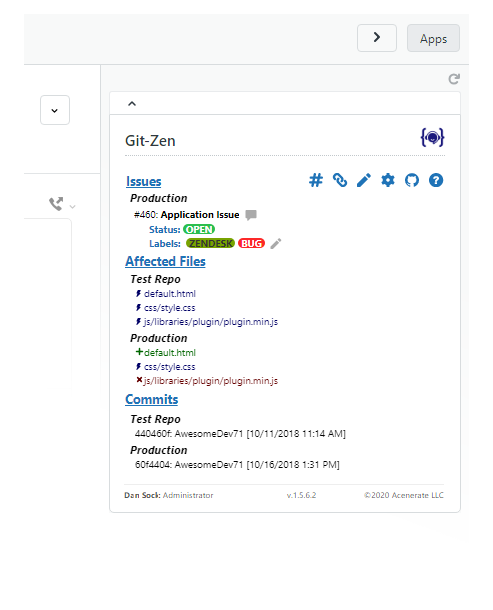
* Create a new Linear issue in one click, with team, project, cycle, priority, labels, and assignee set from Zendesk
* Link an existing Linear issue to the ticket
* See all Linear updates and comments appear automatically in the ticket timeline
From Linear, your engineering team can:
* Reference a Zendesk ticket number in any Linear issue comment. It links to the ticket automatically
* Leave Linear comments that flow into Zendesk as public or private notes
No Linear account needed for support agents. No Zendesk access needed for your engineering team.
Key Features
- Create Linear issues from Zendesk: Team, project, cycle, priority, labels, and assignee set at creation time
- Two-way comment sync: Linear comments appear in Zendesk; ticket comments post to Linear
- Cycle and project support: Assign issues to active sprints and projects directly from Zendesk
- Multiple issues per ticket: Link as many Linear issues as needed to one ticket
- Auto-tagging: Zendesk tickets are automatically tagged when linked or when issues are completed
- Role-based permissions: Control which agents can create or modify Linear issues
- Simple per-agent pricing: $4 per Zendesk agent, per month. Unlimited tickets and integrations. Free trial included.
Works with Linear.
Security
Git-Zen does not store your Zendesk or Linear data. Only configuration settings are held on Git-Zen servers. Authentication uses OAuth 2.0.
For more information, visit https://www.git-zen.com
Détails de l’application
Comment l’installer
Setting Up Linear by Git-Zen
1. Install the App
- Open any Zendesk ticket and click the Apps sidebar.
Authorize Zendesk
Authorize Linear
Configure your organization settings
You're all set!
Laisser un avis
Partagez votre expérience avec le reste de la communauté Zendesk
Formules et tarifs
Default Plan
Free 14-day trial, then $99.00 per month
This is the default plan all existing apps have. You can change the description and name of this plan, or create new ones.
Essai gratuitGit-Zen
Free 14-day trial, then $4.00 per agent, per month
Two-way sync between Zendesk and your engineering and product map tool. Create issues from tickets, reference tickets from commits with gz#12345, and get automatic updates when work closes.
Essai gratuit